134 private links
The timeout script is a useful resource monitoring program for limiting time and memory consumption of processes in Linux. It allows you to run programs under control, and enforce time and memory limits, terminating the program upon violation of these parameters.

This article will give a brief introduction to SSMTP and steps to install it and use the same to send emails from Linux terminal.
This article compares navigating a computer desktop without the desktop. That is, this article demonstrates how to use a terminal to move around and browse your computer as you would on a desktop, but from a terminal instead.
While the terminal may seem mysterious and intimidating at first, it's easy to learn once you realize that a terminal uses the same information as all of your usual applications. There are direct analogs for everything you do in a GUI to most of the everyday activities you do in a terminal. So instead of starting your journey with the shell by learning terminal commands, begin with everyday tasks that you're already familiar with.
- View file lists (
ls) - Open a folder (
cd) - Close a folder (
cd ~) - Navigate directories (
cd) - Absolute paths
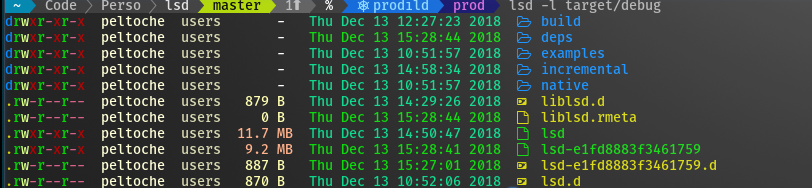
Software for solving crossword puzzles in the terminal.
cursewords is a small Python program to open, navigate, and solve puzzles stored as .puz files.
A simple CLI text adventure game, created for learning purposes.
Project objectives
- Fully functional dungeon system for exploration.
- Creating an inventory system with the ability to pickup, eat and get info about items found throughout the dungeon
- Enemies distributed over dungeon entrances, explore further by beating them in a role-based combat system.
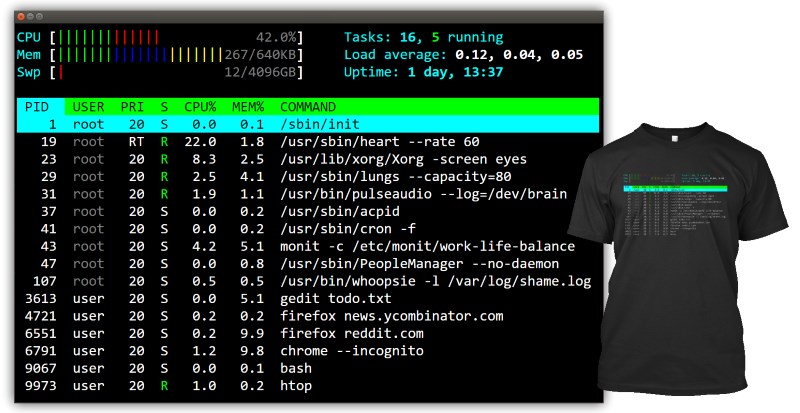
For the longest time I did not know what everything meant in htop.
I thought that load average 1.0 on my two core machine means that the CPU usage is at 50%. That's not quite right. And also, why does it say 1.0?
I decided to look everything up and document it here.
They also say that the best way to learn something is to try to teach it.
In a recent article, we talked about Gogo – a tool to create shortcuts for long paths in a Linux shell. Although gogo is a great way to bookmark your favorite directories inside a shell, however, it has one major limitation; it lacks an auto-completion feature.
Because of the above reason, we went all out to find a similar utility with auto-completion support – where the shell can prompt with suggestions of the available aliases (shortcuts to long and complicated paths) and luckily, after crawling through Github, we discovered Goto.
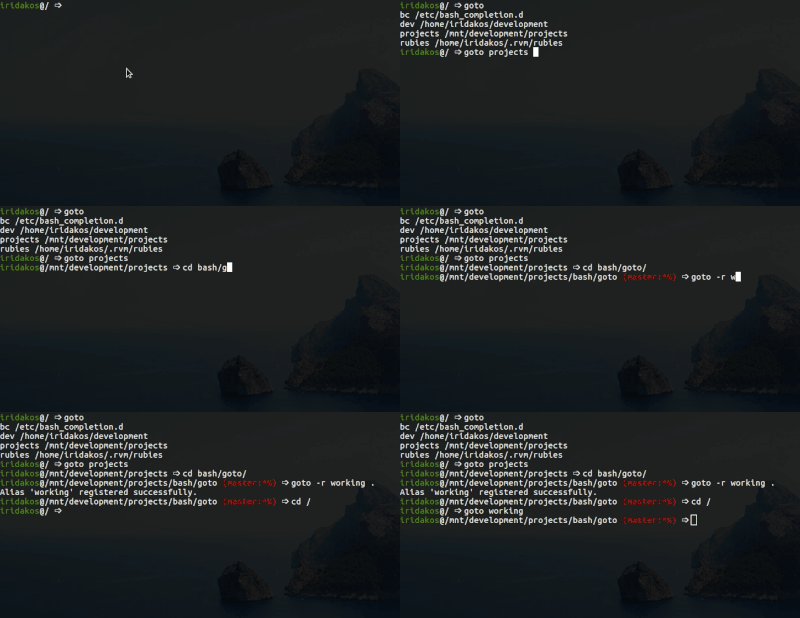
Goto is a shell utility to quickly navigate to aliased directories, with support for auto-completion. It comes with a nice auto-completion script so that once you press the tab key after the goto command or after typing a few charters of an existing alias, bash or zsh prompts with suggestions of the aliases or auto complete the name, respectively.
Goto also has additional options for unregistering an alias, expanding an alias’s value as well as cleaning up aliases of deleted directories. Note that goto’s auto-completion only works for aliases; it is separate from shell auto-completion for commands or filenames.
Linux offers a number of tools for examining your running processes. With the applications shown below, you can find out which applications are eating all your memory and which files are attached to those rogue programs. Or you can just get a global view of how your system is performing.
Regardless of your specific level of interest, this tutorial will offer you a starting point on that journey.
- top
- iotop
- monit
- lsof
- ps_mem
toplip - "the best place to hide something is right under your nose." toplip is our command line, very strong encryption and decryption utility with optional plausible deniability, image embedding, and multiple/variable passphrase complexity.
Feature Highlights
- Very strong encryption (XTS-AES256 based, possibly cascaded)
- Optional "plausible deniability"
- Optional image embedding/extraction (PNG/JPG)
- Optional multiple passphrase protection
- Simplified brute force recovery protection
- No identifiable output markers
- Open source/GPLv3
- Commercial support/training
There are numerous file encryption tools available on the market to protect your files. We have already reviewed some encryption tools such as Cryptomater, Cryptkeeper, CryptGo, Cryptr, Tomb, and GnuPG etc. Today, we will be discussing yet another file encryption and decryption command line utility named “Toplip”.
It is a free and open source encryption utility that uses a very strong encryption method called AES256, along with an XTS-AES design to safeguard your confidential data. Also, it uses Scrypt, a password-based key derivation function, to protect your passphrases against brute-force attacks.
Check cryptocurrencies' prices, changes on your console. Best CLI tool for those who are both Crypto investors and Engineers.
All data comes from coinmarketcap.com APIs.

A while ago, we published a guide about Cli-Fyi – a potentially useful command line query tool. Using Cli-Fyi, we can easily find out the latest price of a cryptocurrency and lots of other useful details. Today, we are going to see yet another cryptcurrency price checker tool called “Coinmon”. Unlike Cli.Fyi, Coinmon is only for checking the price of various cryptocurrencies. Nothing more! Coinmon will check cryptocurrencies’ prices, changes right from your Terminal. It will fetch all details from from coinmarketcap.com APIs. It is quite useful for those who are both Crypto investors and Engineers.
Wise and powerful personal assistant, available in your nearest terminal.

I'm not a big fan of multi-purpose tools.
Yoda allows to: chat with the chatbot, test Internet speed, search in files (mmhh...), tst URLs, retrieve articles from HackerNews, setting goals and keep a diary.
A while ago, we wrote about a command line virtual assistant named “Betty”. Today, I stumbled upon a similar utility called “Yoda”. Yoda is a command line personal assistant who can help you to do...
Suplemon is an open source, modern, powerful, intuitive and feature-rich command-line text editor with multi cursor support; it replicates Sublime Text like functionality in the terminal with the use of Nano.
ddgr is a cmdline utility to search DuckDuckGo from the terminal. While googler is highly popular among cmdline users, in many forums the need of a similar utility for privacy-aware DuckDuckGo came up. DuckDuckGo Bangs are super-cool too! So here's ddgr for you!
Unlike the web interface, you can specify the number of search results you would like to see per page. It's more convenient than skimming through 30-odd search results per page. The default interface is carefully designed to use minimum space without sacrificing readability.
A big advantage of ddgr over googler is DuckDuckGo works over the Tor network.
Console (CLI) text editor with multi cursor support.
Suplemon replicates Sublime Text like functionality in the terminal.
Features
- Proper multi cursor editing, as in Sublime Text
- Syntax highlighting with Text Mate themes
- Autocomplete (based on words in the files that are open)
- Easy Undo/Redo (Ctrl + Z, Ctrl + Y)
- Copy & Paste, with multi line support (and native clipboard support on X11 / Unix and Mac OS)
- Multiple files in tabs
- Powerful Go To feature for jumping to files and lines
- Find, Find next and Find all (Ctrl + F, Ctrl + D, Ctrl + A)
- Custom keyboard shortcuts (and easy-to-use defaults)
- Mouse support
- Restores cursor and scroll positions when reopenning files
- Extensions (easy to write your own)
- Lots more...
Suplemon is a CLI text editor that offers modern features like multi cursor support, keeping the simplicity and ease-to-use of a console text editor.
borgmatic is a simple Python wrapper script for the Borg backup software that initiates a backup, prunes any old backups according to a retention policy, and validates backups for consistency.
The script supports specifying your settings in a declarative configuration file rather than having to put them all on the command-line, and handles common errors.